
You open Steam with an evening to yourself, ready to finally play something, and somehow spend the first half hour weighing up games you already own. There is the RPG you keep saving for a proper weekend, the strategy game whose controls you would have to learn again and a sale purchase you barely remember making, all looking slightly less appealing the longer you stare at them. By the time you launch the usual favourite, half the evening has gone.
When you cannot decide what to play, the useful question is which game would suit tonight. Think about the time and energy you have, narrow your Steam library to three appealing choices and give one a proper session, whether you make the final call yourself or let a game picker help. You can find something worth starting without sorting out the future of your entire backlog.
Choose for tonight, not your entire backlog
The game you are most excited to have finished might be a terrible fit for the evening you actually have. A sprawling RPG can be exactly your thing and still feel like too much after work, particularly when getting started means remembering who everyone is and why your inventory is full of spoons. There is nothing wrong with keeping that adventure for a night when you are looking forward to getting lost in it.
For now, think about what would feel good to play: a challenge that keeps you busy, a story you can settle into or something familiar enough to enjoy without much effort. That usually makes a more useful starting point than comparing everything by reputation, and it gives you a reason to leave some perfectly good games for another day. Include any download or update in the time you have available, because an exciting choice is less useful if you cannot actually get to it tonight.
Game length helps, but the opening hours and stopping points matter too. A long game you already know might suit half an hour beautifully, while a short campaign with a lengthy introduction could take the whole session to get going. Look for a mission, a few puzzles or a convenient save you can reach with the time you have, rather than assuming a short story automatically means easy short sessions.
Give yourself three games to choose from
Once you know the kind of evening you want, pick three games that could give you it. Something you were enjoying last week, an untouched game you are curious about and an old favourite make a useful starting trio, because each offers a different reason to press play. Keep them in a Steam collection if that helps you stay with the shortlist instead of wandering back through everything you own.
Let your preferences do some of the work here. If you want to unwind, leave the demanding games out; if you fancy a fresh start, focus on something you have barely touched, with a favourite genre as another way to narrow it down. When two choices still sound equally appealing, go with the one that is installed and ready, because the extra time spent comparing review scores is time you could be spending finding out whether you enjoy it.
Let a Steam game picker make the final call
If the shortlist has helped but you are still going round in circles, letting something else choose can be a relief. A random Steam game picker can break the tie, although a result from your whole library might send you straight back to scrolling if it ignores the kind of game you feel like playing. A suggestion is more useful when you can see why it belongs in tonight's choices.
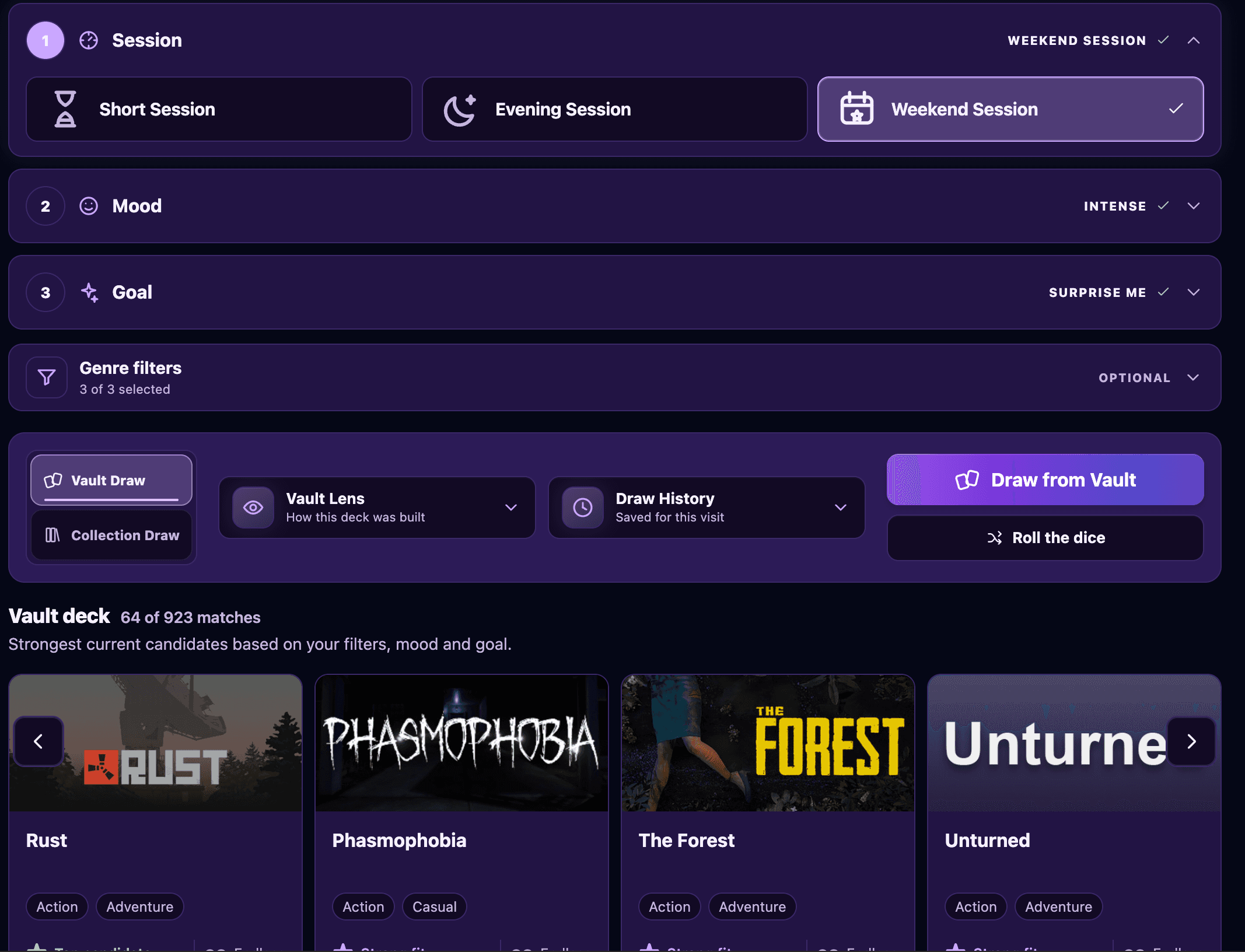
That is the idea behind VaultShuffle: bring in your public Steam library, choose your session, mood and goal, and the Vault draws from the strongest eligible matches while explaining the pick. Try Chill and Something New when you want to unwind with an unfamiliar game, or Finish Something when making progress towards the credits sounds more appealing. A genre filter can narrow things further if you already have something in mind.
Completed games stay out of the draw, and you can blacklist games you do not want suggested without removing them from your Steam library. Read the reasons behind the result and see whether it makes you want to play; the suggestion does not have to be the perfect game for every possible evening, just something you are curious enough to start now.
How to choose from your own Steam library
VaultShuffle is free, and bringing in your library lets the suggestions come from games you already own. Once the import is ready, you can go straight to the Vault and make the choice smaller:
- Bring your library. Continue with Steam from the VaultShuffle homepage, or enter your public Steam profile. Your profile and game details need to be public so the games can be imported.
- Set up a draw. Choose your session, mood and goal in the Vault, with a genre filter if there is something specific you fancy.
- Read your pick. Look at why it was suggested and open it in Steam when you are ready, or save it to Playing Next to keep it handy. You can blacklist an unwanted suggestion or draw again.
If you want to look around before importing anything, guest mode lets you try a draw from a sample library without connecting Steam. Signing in through Steam happens on Steam itself, so VaultShuffle never receives your password, and the FAQ covers imports, privacy and what happens to your saved choices.
Give the game a chance before choosing again
Once you have a game in front of you, get past the settings menu and play enough to see what it is offering. That might mean the first mission or a few rounds rather than a fixed number of minutes, but it gives you something real to base the next decision on. You will know much more about whether you fancy another session after playing than after another evening of comparing store pages.
If it does not land, think about what you were missing: less reading, more action or perhaps something you already knew how to play. Use that to narrow the next choice, and blacklist the game in VaultShuffle if you know you do not want it appearing in future picks. You can leave it in your Steam library without having it compete for your attention every time you want something to play.
If the thought of reaching the credits is what gets you excited about starting, our picks for short Steam Deck games you can beat in under 10 hours give you a few places to begin. Otherwise, leave the rest of the backlog for another day and see where this game takes you, because actually enjoying a session is a better result than finally settling on a perfect plan for everything you own.